Contents
 Welcome
    AI-Based Coaching
       Athlete Training Context
       Chat Page
       Training Plans
 Getting Started
    System Requirements
    Cycling Equipment Requirements
    Training Knowledge Requirements
    Registration
    Creating Power Zones/Interval Specifications
    Creating Heart Rate Zones
    Training Load Settings
    Logging In
    Interval Detection & Selection Overview
 Rides
    Uploading A Ride
       Handling Missing Seconds
       Wahoo Cloud Sync
       Garmin Connect Sync
       Ride Backfill Request Utility
       Ride Load Status Checker
    Adding A Manual Ride
    Finding Rides
    Deleting Rides
    Exporting Rides
    Ride Feed
    Ride Calendar
    The Ride Page
       Ride Header
       Map
       Ride Graph
       Intervals
       Heart Rate Zone Distribution
       Power Zone Distribution
       Cadence Distribution
       Power Curve
       Stats
       Laps
       Training Progress
       Edit Ride
       Comments
       Zwift Workout Generator
       Workout Performance Report
    KPower
       Uploading KPower Rides
       Curating KPower Source Rides
 Reports
    Race Readiness Graph
    Power Curves
    Rider Stats Year Over Year
    Personal Records
       Personal Records Overview
       Personal Records Report
       Personal Records - Workload Correlations
    Ride Summary Charts
    Critical Power
       Overview
       Generating A CP Graph
       Critical Power History
       Critical Power History Backfill
    Fitness Signature
    Hammer Score Leaderboard
    Training Effectiveness
    Rider Assessment
    Plan Strategy
 Workouts
    Workout Builder Screen
    Adding A Workout
    Adding A Block
    Adding A Component To The Workout Graph
    Deleting A Block
    Insertion Points
    Fixing A Block Mistake
    Multi Select Blocks
       Building
       Saving As A Component
       Removing Multi Select
    Finding Workouts
    Editing Workouts
    Deleting A Workout
    Generating A Zwift Workout
    Components
    Downloading Workouts
    Workout Projections
    Scheduling A Workout
       Rescheduling A Workout
    Deleting A Workout From The Schedule
    Viewing A Workout Performance Report
    Importing A Workout
    Interval Advisor
       Saving A Recommendation
       Adaptive Workouts
    Curating Interval Advisor Source Rides
 Other Functions
    Changing General Settings
    Changing Rider Assessment Settings
    Changing Power Zones/Interval Specifications
    Changing Heart Rate Zones
    Changing Training Load Settings
    Coaches And Friends
    Viewing The Terms Of Service
    Viewing The Privacy Policy
    Logging Out
    Evaluating Progress
    Changing Advanced Settings
    Notifications
       Insights
          Critical Power AWC Check
          Training Effectiveness
          Interval Workload Levels
       Warnings
          FTP CP Mismatch Warning
    Changing Bicycle Settings
 FAQ
    General FAQ
  
Index

Home > Welcome > AI-Based Coaching > Chat Page

Chat Page

To view the screen from the main menu take [Rides]->[Chat Client]

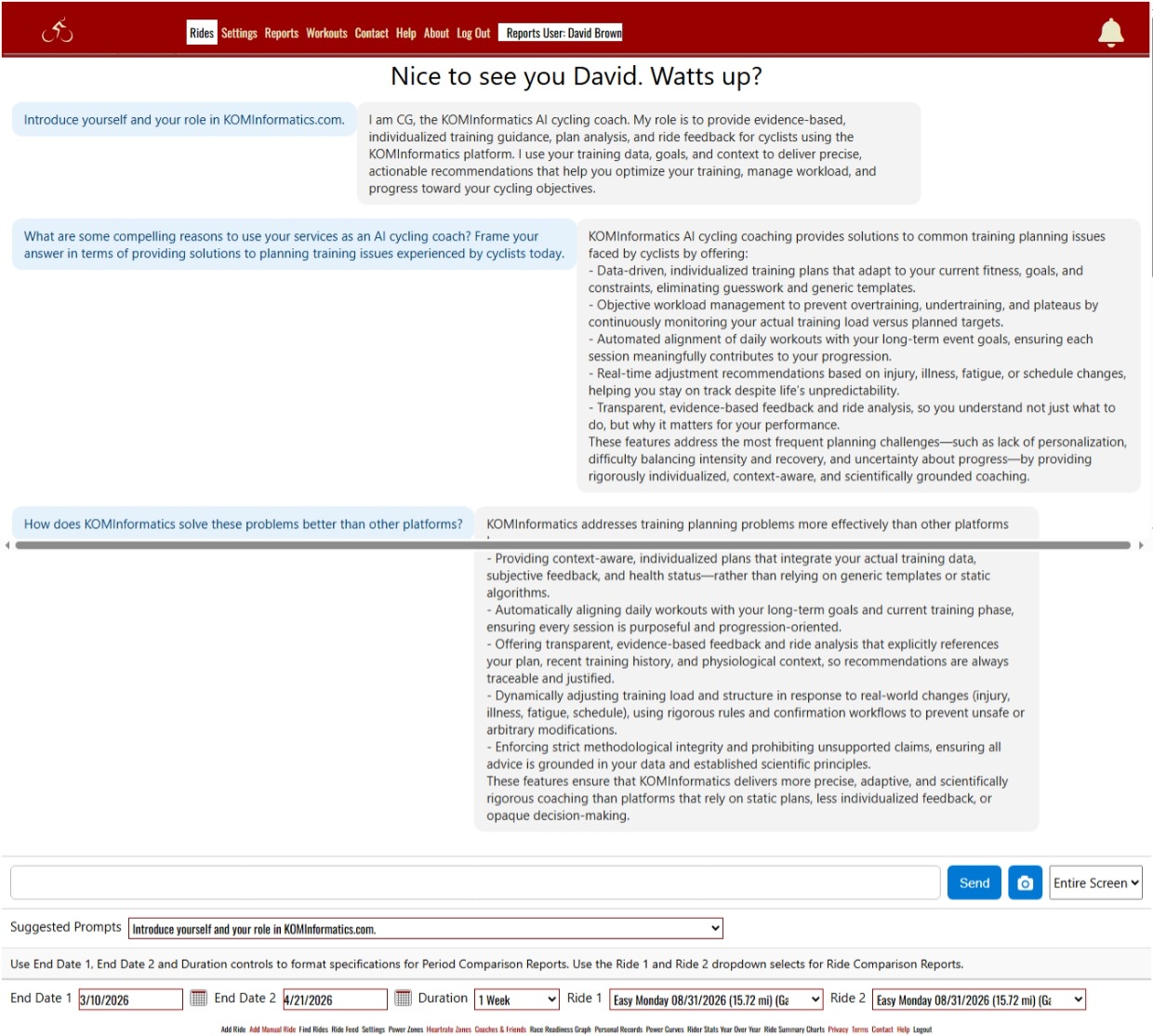
The KOMInformatics chat interface should be familiar to anyone that sends text messages or uses other chat-based software. You type in a prompt (a question or request) to the prompt input, or select from over 30 pre-programmed prompts from the Suggested Prompts dropdown list. You then either click the [Send] button, or press the [Enter] key. Coach CG, the KOMInformatics AI will analyze your question and deliver a response. Some prompts will yield structured output reports. (There are 7 of these at this writing.). Beyond the suggested prompts, you can ask CG about anything related to cycling training! Coach CG has turn-by-turn immediate access to a wealth of your cycling training information and can call over 20 tools to obtain more. The only personal information he has about you is your first name. Identifying information such as last name or email address is not available to him.

Cyclists often ask what makes KOMInformatics different from other training platforms. CG — our evidence‑based AI cycling coach — explains how individualized guidance, objective workload management, and transparent analysis solve the most common training‑planning problems athletes face today. CG is currently in early‑phase testing with a limited group of KOMInformatics users as we refine his coaching logic and integration with the platform. The eventual plan is to make CG and related coaching/planning functions subscription-based.
See also

  
HelpConsole 2007 - Standard

Copyright © 2004 - 2007 Extreme Ease Software Inc. All Rights Reserved.